 Klyra
Klyra
From idea to published, all your content in one place.
Your ideas, scripts, schedule, tasks and sponsors in a single workspace. No Notion system to build, no ten tools to juggle.
✓No credit card·✓Free plan, no time limit·✓App interface in French
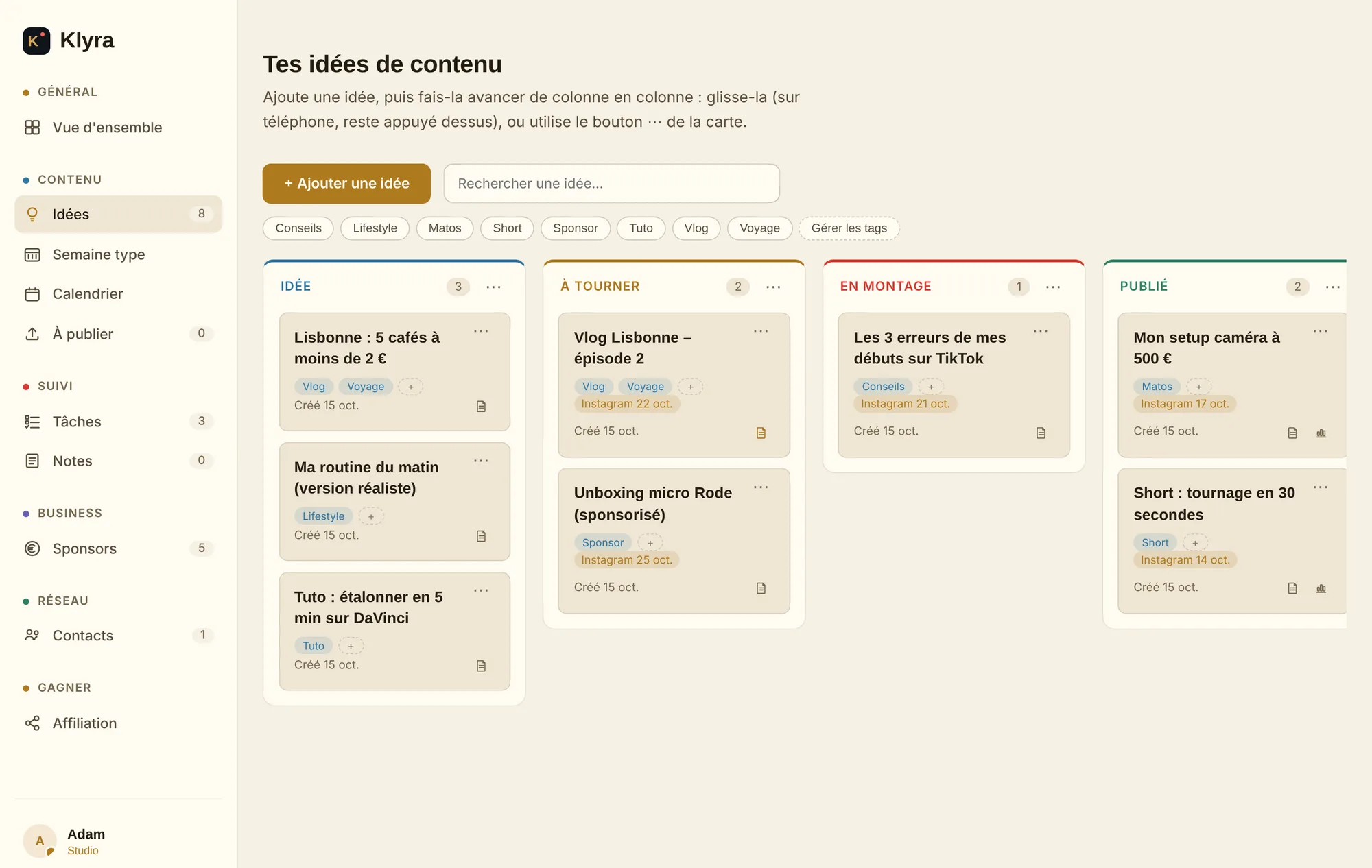


Klyra in 9 seconds
Your content moves forward. You see it all, live.
An idea saved, a script added, a video scheduled, a sponsor paid: all in one place.
Illustrative example
Your content is everywhere. Except in one place.
An idea in your Notes app, a schedule in your head, a sponsor in a spreadsheet that's never up to date. It's not a lack of organization, it's just too many tools.
Up and running in under 2 minutes
No system to build, no template to set up. You sign up, and everything is ready.
Create your account
An email and a password. No credit card, no questionnaire.
Save your first idea
A title is enough. Add the script and details whenever you want.
Take it further
Add a date or a task, and your idea becomes content in progress.
No need to migrate everything: start with your next ideas.
Every step of your content has its place
Klyra follows the real journey of a piece of content, not a list of generic features.
- Idea
- Prepare
- Plan
- Create
- Publish
- Get sponsored
Idea bank
Save an idea the moment it hits you and move it forward with drag and drop: idea → to shoot → editing → published. Each idea can also hold its full script.
Publishing calendar
Schedule your ideas on a specific date and see your whole month of content at a glance.
Ready to publish
All your upcoming posts in one list, with a direct link to YouTube, TikTok, Instagram or X and a reminder on the day.
Sponsor tracking
A 5-stage pipeline for your brand deals, with the total in euros calculated automatically for each column.
And everything else, in the same place
Weekly routine
Your recurring weekly rhythm, day by day: notes, checklists and time slots you can drag and duplicate as you like.
Tasks
Due dates, priorities and progress. Link each task to an idea or a deal so nothing slips through the cracks.
Notes
Rich notes with checklists and bullet lists, reorganized by drag and drop, for everything that doesn't fit anywhere else.
Contact book
Editors, camera operators, photographers, brands: keep your network of collaborators at hand.
Always in sync
Automatic saving on every action. Come back and everything is exactly where you left it.
Tap a module to see the details.
“I could do this in Notion”
Sure. But Notion leaves you to build your own system. Klyra gives you a creator's system, ready to go.
Notion, Notes, Calendar, spreadsheets
Generic building blocks to put together
- A system you have to build and maintain yourself
- Your ideas, schedule and sponsors in separate tools
- No link between an idea, its script and its date
- Nothing tells you what to publish today
Klyra
A creator's workflow, ready to use
- Ready from sign-up, nothing to configure
- Ideas, schedule, tasks and sponsors in one workspace
- Each idea keeps its script, date and status
- A “Ready to publish” list with links to your platforms
Klyra is simple on purpose: no team management, just what you need to create. Its AI assistant saves you time, but never replaces your creativity.
“Finally a tool built for a solo creator, not for a video agency billing clients.”
Adam Sagardoy, founder of Klyra
“I'm Adam. I make short films and videos for Instagram and TikTok. My ideas were everywhere: in my notes, my screenshots, my head. I tracked my sponsors in my DMs. I tried Notion, and spent more time building my system than actually filming. So I built Klyra: the tool I wish I'd had.”
AdamContent creator and founder of Klyra
Start for free. Upgrade for €5 when Klyra becomes essential.
No time-limited trial: the Free plan stays free.
To discover Klyra and use it on your real content.
- 20 ideas with scripts
- 30 tasks
- 5 sponsor deals
- 10 contacts and 15 notes
- Automatic saving
For a regular creator who plans content ahead.
- 100 ideas, 50 tasks, 25 deals
- Publishing calendar
- Weekly routine
- “Ready to publish” list with reminders
- Claude connector
- AI assistant: 30 uses per month
- Unlimited notes
For heavy use, with lots of content and sponsors.
- Everything in Creator
- Everything unlimited
- AI assistant: 100 uses per month
- Data export (CSV)
- Priority support
Klyra for life
Rather not have a subscription? Pay once and keep everything in Studio forever.
Questions you might have before starting
Is the Free plan really free?
Yes. No credit card at sign-up and no time limit. You only upgrade if you need more room or the calendar.
Do I have to migrate everything from my current tools?
No. Just start with your next ideas. You don't need to import anything for Klyra to be useful from day one.
Can I cancel my subscription anytime?
Yes, there is no commitment. You cancel yourself from Settings → Subscription, and keep your plan until the end of the period you already paid for.
Where is my data stored?
Your data is hosted by Supabase and payments are handled by Stripe: Klyra never sees your card details. You can delete your account at any time from Settings.
Does it work on my phone?
Yes. Klyra runs in your phone's browser and can be added to your home screen like an app.
Is there AI in Klyra?
Yes, with a deliberate limit: Klyra's AI doesn't write your videos for you and doesn't replace your creativity. Your ideas, scripts and voice stay yours. The assistant helps with the rest: writing a message to a brand, preparing a post (title, description, hashtags), reworking a script you wrote, turning notes into tasks or preparing a call with a sponsor. You always review and edit: nothing is published or sent without you. It's included in the Creator plan (30 uses per month), and in Studio and Lifetime (100 per month).
Is Klyra available in English?
The app interface is currently in French. It's simple and visual, so many creators use it without speaking French, but an English version of the app isn't available yet.
Ready to get your ideas out of your head?
Create your account and save your first idea in under 2 minutes.
Start for free